Showing posts with label RootsMagic. Show all posts

Friday, September 19, 2025

How to Clean Your Ancestry Tree Without Paying for Pro Tools Part 3


AI Generated

For the past two weeks I’ve been blogging about Ancestry.com’s Pro Tools. You can read about my experience here and here.

Today, I’m going to show you how to clean your Ancestry tree without paying for Pro Tools. It’s super easy and honestly, I wish I’d thought of this years ago.

Start by picking a free or low-cost software program. Family Tree Maker and RootsMagic both sync directly with Ancestry. RootsMagic Essentials is free, but large trees can slow it down (I blogged about that here). If you don’t need access to your photos or documents and just want to focus on fixing errors, you can also download your tree as a GEDCOM and import it into Legacy Family Tree, which is what I did.

I kept things simple. I didn’t need media files for the check up, I just wanted to identify structural problems in my tree.

Here’s how to do it:

  1. On Ancestry, go to your tree.
  2. Click Tree Settings under Trees > Create & Manage Trees.
  3. Scroll down and select Export Tree.
  4. Once complete, download the file to your computer (it usually lands in your Downloads folder or OneDrive).
  5. Open your genealogy software and import the GEDCOM.
  6. Run the problem checker.

If you run into trouble with the software, you can literally ask ChatGPT (aka Geni!) for help. That’s how I found this entire workaround.

Once your tree is loaded, use the software’s built-in tools to flag potential problems. In Legacy, I went to Tools > Potential Problems. I set criteria to mirror the kinds of problems flagged by Ancestry’s Pro Tools, things like parents being too young, children born after a parent’s death, and so on.

One downside: Legacy doesn’t flag individuals with no sources, which was one of the main issues Pro Tools surfaced. But what Legacy did reveal was surprising and far more accurate.

Here’s the report I got from Legacy (the error types flagged by Ancestry are in red):
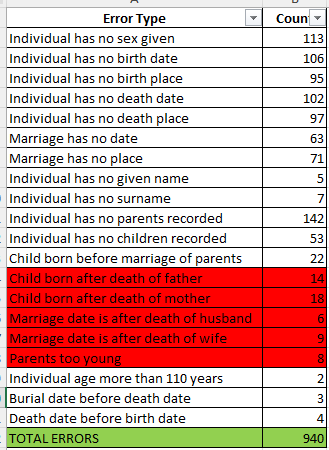
Let that sink in: 940 total errors, almost all of which are legitimate and actionable. Of that, there was only 55 errors that Ancestry claimed was 301 and they didn't identify these people! I plan on cleaning up all of the errors Legacy found as having two individuals over age 110 years is a problem Ancestry should have discovered. And the individuals with no sex given? That is a continual flaw in Ancestry's system when you are adding new individuals.

Unlike Ancestry’s Tree Checker, which falsely flagged over 10,000+ records in my tree, Legacy gave me a clean, accurate list I could work with. I now have the names and the issues. I’m going through them one by one and making the corrections directly in my Ancestry tree, since that’s still my primary working tree. I’ll continue syncing it with Family Tree Maker.

And if I get another $7 Pro Tools offer in the future? Sure, I might try it again just to check whether they’ve cleaned up the bugs. But I’ll cancel it right after. Because let’s be honest:

If Ancestry really wants our trees to be accurate, they should provide these tools for free.

We are already paying for the data, the DNA, the platform and in many cases, contributing our own hard-earned research. Charging extra for a tree-checking feature (that doesn’t even work right) feels like asking users to fix the foundation of the house they already paid to build.

So, skip the upsell. Use free software. Clean your tree with confidence. And let’s keep our standards higher than their price tags.

Friday, August 1, 2025

The Summer of My Genealogical Discontent Lesson 5 - Software Shuffle

                                                                             AI Image

Welcome to another installment in my continuing series on genealogical misadventures! Today’s topic: my long, bumpy road with technology.

I’ve always embraced tech—but it didn’t always embrace me back.

Back in college, I took a programming course in PLC. The professor told us to throw out the textbook and “go with our gut.” Let’s just say... my gut wasn’t fluent in code. I had signed up for the course because my then-boyfriend (now husband) raved about it. Mid semester, I switched to a new instructor—Dr. Birkin, a kind man with a charming British accent who actually used the textbook. I passed the class, but the experience left me scarred. We were still programming with punch cards back then, and one typo could bring the whole system down. I managed to do exactly that once—and earned a full hour of death stares from the engineering students.

So, when software for genealogy came along, I dove in eagerly—because at least I wasn’t programming it myself! But it turns out software has its own kind of drama.

My big misstep? Relying on just one platform.

At first, I uploaded everything—sources, photos, notes—into Ancestry.com. It was easy. It was convenient. It was also incredibly risky.

Because here’s the thing: if Ancestry ever disappears (and nothing digital is forever), so does everything I’ve painstakingly added. Paranoia, in genealogy, can be a healthy survival strategy. And that means backing up your work in multiple places.

When Family Tree Maker (FTM) was integrated with Ancestry in its early years, I jumped onboard. But then the sync stopped working. Ancestry blamed FTM. FTM blamed Ancestry. I spent a year caught in the crossfire, and finally gave up. So did Ancestry—they ditched FTM and partnered with RootsMagic instead.

I gave RootsMagic a try. I liked it—until it came time to update my records. One. At. A. Time. It was tedious, and I let it slide. Eventually, that program stopped cooperating too.

I also dabbled with Legacy Family Tree. I appreciated its features, but the downside? It doesn’t sync with Ancestry. My sources were preserved—but not my photos or documents. Still, it remains part of my backup plan.

Then, about three years ago, Family Tree Maker came back around with an offer. After a helpful chat with their support team, I gave them another shot. The sync worked again—thankfully—just as RootsMagic had failed me.

So, what have I learned from this revolving door of software?

Stay current. Stay flexible. And never trust your entire tree to a single platform.

Test new tools. Keep your programs updated. And most importantly, store your research in more than one place—cloud, external drive, software, even printed backups. Because when one system crashes (and eventually, it will), you’ll have something to fall back on.

If you think you’re immune to tech mishaps, I’ll leave you with this: the only thing more painful than lost records… is knowing you had them, once.

Saturday, March 30, 2024

Printing Your Family Tree - More Options


AI Generated

Last week I blogged about how to print your family tree from the three genealogy giant sites - Ancestry.com, FamilySearch.org, and MyHeritage.com. If you don't pay for a subscription or you don't want to rely on FamilySearch's free site because of other people changing the tree for the worse, there are more options for you. Many genealogy software companies that will allow you to purchase their package for under $50.00. Sometimes, you can even get it for as low as $20.00! Those specials are usually available for a limited time, especially during a major conference, like RootsTech. The next one coming up is the National Genealogical Society conference in May. This would be a great Mother's Day gift or early Father's Day one, as well! I recommend you check out the ones I'm mentioning below by visiting their website. They have cookies so will know you visited. These cookies don't add pounds, they'll just save you money as you'll get offer discounts sent to you.

RootsMagic9 synchs with Ancestry.com. This means, if you decide someday to get a subscription to Ancestry, you can upload the tree you are building on RootsMagic9 quickly. If you have no intention of ever getting an Ancestry account, no worries! You still have a means to build a family tree, print it, save photos and records to individuals, create narratives, and share with family if they have the program.

FamilyTreeMaker (FTM) also synchs with Ancestry.com. This program does everything that RootsMagic9 does. So, which should you get?

I have both because they have slightly different options. What works for me might not be what works for you so my advice is to go to both websites and download a free version, though usually FTM doesn't have a free version. They may be getting ready to put out a new edition so keep visiting as that's usually the time for freebie or lost cost to purchase options. Play with it. If you like it and it meets your need, purchase it.

Legacy Family Tree does not synch with Ancestry.com. I can download a gedcom file from Ancestry and upload it to Legacy. That saves time in not having to type everything in my tree again but it DOES NOT SAVE MEDIA! This means, all photos will not be available to view on Legacy. If you think you might want to someday purchase a MyHeritage.com subscription, though, Legacy is for you because it does synch with MyHeritage. I really like some of the charts that Legacy has that the two others don't have so yes, I have this software, too. Like with RootsMagic, try it for free.

There are other companies out there but these are the ones that are most used and which I am familiar with.

When you decide on a software program, PLEASE DO NOT save it only to your computer. If your computer crashes you have lost everything. That's one of the perks of paying for a subscription - your tree info is saved in the cloud. So, save to a thumb drive if your tree is small, or a stand alone hard drive if your tree is large. Another option is to purchase your own cloud storage through Dropbox, Google, or Amazon. I personally recommend making a copy on a stand alone hard drive and giving it to a family member. In case something happens to your home, there is another copy somewhere safe. Periodically, you can get it back and update it.

Lots of options to think about! Whichever you decide you can always make another choice if it isn't working out. 

Wednesday, November 29, 2023

Comparing AI Generated Narratives from Ancestry.com, FamilySearch.org, MyHeritage.com, Legacy Family Tree, RootsMagic, and FamilyTreeMaker


NOTE: This blog was posted on 25 Nov 2023 on the Empowering Genealogists with Artificial Intelligence Facebook group. Since my blog two weeks ago on using AI to write a narrative, I've been getting a lot of questions and comments. I've been told that AI doesn't work with some sites; I have found that to be not true. I have also found a temporary work around for footnote/endnote citations that look more like what genealogists use - simply provide this prompt: Please write all footnotes in Chicago format style. You will have to go back and fill in some info, like the enumeration district for censuses, but it will be closer to what we are used to seeing.
 
I was interested in seeing how a narrative summary with endnotes from various sources that had similar data would be written.

I used the same prompt:  You are a professional genealogist and expert writer. Please write a narrative summary with endnotes from the attached file. (AI seems to place all sources at the end, whether you make the request as a footnote or endnote. This could be due to my requested writings being short.) The endnotes for the example below are funky looking because they are sources from sources, meaning the information that was being compared was the main source, like Ancestry.com, and not where the source cited in Ancestry.com came from.

Each request was made using a new message on ChatGPT.

The files I uploaded individually were:

Ancestry.com from Life Story with and without AI. AI selected “What was (region) like when (individual) was (event).”

FamilySearch.org Source/Detail and About

FamilyTreeMaker from Individual Report

LegacyFamilyTree from Other Reports>Individual Summary

MyHeritage.com side view of Family Tree for named individual

Roots Magic from Reports> Individual Summary

The information for all but FamilySearch.org was generated by me over the years. The data was always entered into Ancestry.com, then synched with RootsMagic and FamilyTreeMaker. A gedcom from Ancestry was uploaded to both LegacyFamilyTree and MyHeritage so no media is available on either of those sites. FamilySearch.org does include a minimal amount of information from me but most of the data was generated by family members.

I then gave ChatGPT the following prompt:

Today you are an expert data analysis and professional genealogist. Prioritize fidelity to the information below; dry recitation, avoid editorialization. Process the data sentence-by-sentence, from beginning to end. Extract this structured data: "Name", "Relationship", "Event Year and Location Baptism", “Event Year and Location Marriage”, “Event Year and Location Children”, “Event Year and Location Death”. The response should have the header row in line 1: "Data From:", "Name", "Relationship", "Baptism" "Marriage", "Children Name & Birth Year", "Death". Column A should have the header row: "Ancestry.com With AI", "Ancestry.com Without AI", "FamilySearch About", "FamilySearch Source & Detail", "Family Tree Maker", "Legacy Family Tree", "MyHeritage.com", "RootsMagic". Enclose all cells or fields in quotation marks; omit, ignore, and avoid commas and other punctuation in the original data in your response in an attempt to keep the CSV error-free. Display dates in military format meaning day month spelled out and not by number and year. Display your response in a code window for easy copy-and-paste.

The results are attached above. I’ve color coded them to denote synch (pale green), gedcom (blue), not my own data (yellow).

Interesting how the diacritical marks are shown by Ancestry, Legacy, MyHeritage, and RootsMagic. FamilyTreeMaker omitted them. The apostrophe before and after August was originally quotation marks. Not sure if that is standardization issues or software/technical limitations.

I was surprised that Ancestry, which has the full location for events, simplifies to only provided county and state. The complete marriage location would be Baileytown, Westchester Township, Porter, Indiana. I wondered why Westchester Township was omitted and discovered I had never entered that in any of my generated trees. I had mis-entered death location as Chesterton Township instead of Chesterton, Westchester Township. This is a nice way to enhance and correct your data. (Chesterton is actually in three townships but the events occurred in Westchester).

All of the sites had the names of children. FamilySearch provided the most information (child’s name and dates). Legacy and FamilyTreeMaker both named all children. Not sure why RootsMagic didn’t specify. And now we know MyHeritage considers six children as “several.” Personally, I’d call that a handful plus!

I can see another use for this when trying to figure out where online public trees vary from yours and what source info (if any) they might have. It’s also a nice clean timeline that takes little effort to create.

Next I decided to take the Excel info, re-enter it into ChatGPT and give the original narrative prompt again. Since every narrative had been slightly different I wondered what the final product with the full information available would be. (I should mention I did the first narrative a few weeks ago in RootsMagic and there were three hallucinations but the rest I did on Wednesday and there were none.) Here is the compiled narrative:

Samuel 'August' Samuelson was a pivotal figure in his family lineage, with his life journey documented across multiple genealogical platforms. Born on January 3, 1839, in Stora Haddebo, Västra Harg, Östergötland, Sweden, Samuel was the son of Samuel Howard Erickson and Anna Elisabet 'Lisa' Torstensdotter. His baptism, a significant event in his early life, is consistently recorded in these sources, reaffirming the importance of his Swedish origins.

Samuel's life took a significant turn when he married on February 17, 1871. While the exact location of his marriage varies slightly in records, ranging from Baileytown to Westchester Township in Porter, Indiana, it's clear that this event marked his transition into family life in the United States.

The couple was blessed with several children, though the records differ in detailing their names and birth years. FamilySearch Source & Detail provides the most comprehensive list, including Johan Victor (1872-1921), John Louis (1873-1919), Alfrida (1874-1886), Ada Emilia (b. 1876), and two sons named Gustav Theodore (the first born in 1877 and died the same year, and the second born in 1879). This detail adds depth to our understanding of Samuel's role as a father and the legacy he left behind.

Samuel's life came to an end on January 14, 1908, in Chesterton, Porter, Indiana. The consistency of this date across multiple records emphasizes its accuracy and the end of an era in the Samuelson family history.

Endnotes:

  1. Baptism and Birth: Samuel's baptism and birth details are consistently recorded across Legacy Family Tree, Family Tree Maker, FamilySearch Source & Detail, MyHeritage.com, Ancestry.com (with and without AI), and RootsMagic.
  2. Marriage: The date of marriage is consistently noted as February 17, 1871, but the location varies slightly, as recorded in different databases.
  3. Children: The most detailed account of his children is provided by FamilySearch Source & Detail, with other databases offering varying levels of detail.
  4. Death: Samuel's death date is uniformly recorded as January 14, 1908, across all sources, with slight variations in the location's specificity.


Saturday, October 16, 2021

RootsMagic 8

New Settings for Links on RootsMagic 8Kind of apropos that RootsMagic decided to unveil their new software during the magical month of October. There are a lot of changes and I have only begun to learn the new software. Here's my experiences so far... A week ago Sunday I tried to purchase the new version via a link in an email I received. The link didn't work. Since I've been a long time user of the program and wasn't a new subscriber, I could simply purchase an update instead of the new version's software. The prices change beginning on 10/17 so I wanted to take advantage of the special offer. Since the email link didn't work I Googled for the product. I was entering my info but when I clicked to complete the transaction I got an error message that my card didn't go through. I tried again. It still declined. I then got a bank alert that they had put the card on hold - did I really make that purchase? After informing the bank I had, I thought that the transaction would go through. By the following day it still hadn't; after checking my credit card and seeing that the bank did not process the payment I went back to the site and tried again. Got the same decline message. I pulled out a different card and it went through with no problem as minutes later I had an email with my confirmation of the order and another email with the download instructions. Don't understand why the first card didn't work as I used it before and since with no problem anywhere else. I went back to the site and tried to download. So far - so good! The program looks very different. I thought I would try to link with Ancestry.com and download my Main Tree again as I had with the previous version. I knew I was signed out of my RootsMagic 7 link as I had tried that a week earlier and it would not allow me to sign back into Ancestry. Every time I logged into Ancestry through Version 8 the program would freeze. Sometimes I got a runtime error, sometime I received a message that I was out of space. Other times it just stopped working and I had to shut the program down through Task Manager (control + alt + delete). Unbeknownst to me, Version 8 was moving everything from Version 7. Since my trees have a lot of data and images, this took time. I wish that information had been available because I wasted time over two days to try to get an Ancestry connection. On the third day I discovered, while poking around the new software, that all of my trees from previous RootsMagic versions had been loaded into 8. I clicked on my largest tree to check to make sure everything had moved. It then asked me again if I wanted to link to Ancestry.com which I wanted. I went to bed before the program finished. The next day, the program was again frozen. Yes, the Disney musical Frozen is Magical but what I was experiencing was not! I again closed it out and reopened it. I could see photos, which was a plus. Before I started clicking into individuals to verify that stories and research had also been saved, I received the popup at the top of this blog. So, I followed the instructions above and signed into FamilySearch. I'm not sure how that's going to work because FamilySearch does not allow you to permanently be signed in unless you have a church membership, which I do not. Maybe there has been a deal cut with RootsMagic that I'm not aware of. The Ancestry direction is interesting as I would have had to spend a lot of time looking around the site to discover where the update for that was located. I don't know why it wasn't under Settings where you'd find the other companies. I also don't understand why I have to keep signing into Ancestry. There are several online courses to help users and I intend to view them soon. If you are new to RootsMagic and this is turning you against buying it, that's not my intention. I loved the past software and the tech support in the past. I expect it will continue but this new makeover is quite dramatic. This program does permit you to identify any changes you make to your Ancestry.com tree and add to your RootsMagic tree. It was time consuming if you didn't do it periodically but it was a nice way to save all of your information on your desktop, external hard drive or another cloud in case there is a problem with Ancestry.com For the old time users, I'm sure we'll get the hang of the changes soon; I just wanted to let you know where you used to get linking info is not where it now resides. Patience in genealogy is important and with this change, even more so.

A Twist of Stones

  Dover Castle Aerial Panorama by Chensiuyan, Wikipedia Commons, 26 Jun 2017. Sometimes genealogy has a strange sense of humor. I w...