Showing posts with label ChatGPT. Show all posts

Saturday, September 5, 2026

2. Customizing ChatGPT: The Five Minutes That Will Save You Hours


In my last article, I explained why every genealogist should customize their artificial intelligence assistant before asking it to help with research. Think of it as introducing a new research assistant to your way of working.

Now let's put that idea into practice with ChatGPT.

The entire process takes only a few minutes, yet it can dramatically improve the quality and consistency of the responses you receive.

Step 1: Open Your Settings

Sign in to ChatGPT.

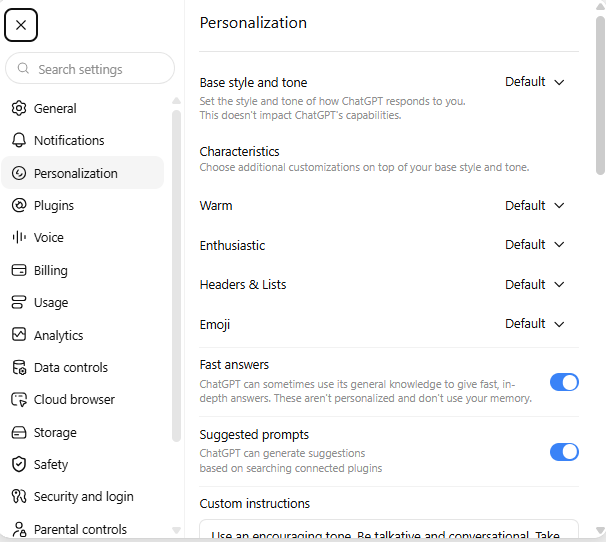
Select your profile icon in the lower left corner of the screen, clicking on the circle.

From the dropdown, select Personalization. This is where you'll find the options that allow ChatGPT to adapt to the way you work.

Click on Personalization and scroll down to the box under Custom Instructions. That's where you will put in your directions.

Step 2: Tell ChatGPT About Your Work

Don't write a biography.

Instead, tell ChatGPT what it needs to know in order to work effectively with you.

For example, you might include:

• I am an intermediate genealogist researching families in Ohio and Pennsylvania.

• I prefer Chicago-style source citations.

• Always distinguish between facts, evidence, assumptions, and hypotheses.

• Never invent missing information.

• State clearly when evidence is inconclusive.

• Use military-style dates such as 21 March 1850.

• Write in a conversational but professional tone.

Notice that none of these instructions reveal private information. They simply describe how you want your AI assistant to approach its work.

Step 3: Explain How You Like Information Presented

Formatting matters.

If you frequently ask ChatGPT to create timelines, research plans, proof summaries, tables, or blog posts, mention that in your instructions.

For example:

"I prefer timelines arranged chronologically."

"Separate proven facts from working hypotheses."

"Use headings and short paragraphs for readability."

The more consistently you work, the more useful these instructions become.

Step 4: Don't Try to Tell It Everything

One mistake I often see is people creating pages and pages of instructions. My research assistant, Geni, informed me that someone uploade 60 pages here.

Resist the temptation.

Long instruction lists often include information that is rarely used or eventually becomes outdated.

Instead, include only those preferences that affect most of your conversations.

You can always provide additional instructions for a particular project when needed.

Don't forget to hit SAVE!

Step 5: Update Your Settings Over Time

Your settings should evolve.

Whenever you notice yourself making the same correction repeatedly, consider adding that instruction to your saved preferences.

Perhaps you always ask ChatGPT to avoid speculation. Maybe you repeatedly remind it to cite sources or to identify conflicting evidence.

If you're saying the same thing over and over, your settings probably need an update.

Remember: Settings Are Not Magic

Custom instructions improve consistency, but they do not replace careful review.

I still verify every citation, read every record myself, and evaluate every conclusion before I publish or share it with a client.

AI is an assistant, not a substitute for genealogical judgment.

A few minutes spent customizing ChatGPT today can save hours of rewriting tomorrow.

In the next article, we'll compare how Gemini, Claude, and Perplexity allow you to personalize their responses and discuss which features are most useful for genealogists.

Friday, February 27, 2026

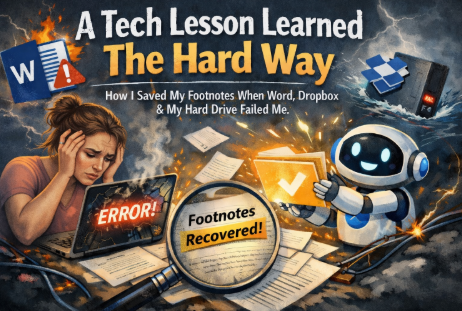
A Tech Lesson Learned The Hard Way


AI Image

Oh, technology. You love it when it works and you despise it when it fails.

I recently had a failure that stopped me cold, even though I was absolutely certain I had done everything right. I’m sharing what happened so you can avoid making the same mistake.

My number one rule has always been to back up. And I do. Religiously. But sometimes, even that isn’t enough.

I was working on Volume 5 of Echoes of Britannia when I realized it had grown too large and really needed to be split. I saved Volume 5, made a copy on my desktop, and renamed that copy Volume 6. Then I opened Volume 5, deleted the material that would live in Volume 6, saved, and closed it. Next, I opened Volume 6, deleted the material that belonged in Volume 5, saved, and closed that file as well.

That evening, I saved both files to Dropbox and to a standalone external hard drive.

All seemed right with the world. Sure.

Three weeks later, while working on Volume 8, I became confused about a pedigree and reopened Volume 6 to double-check a spouse. That’s when I noticed something was wrong. The footnote I was looking for was gone. In fact, nearly three-quarters of the footnotes in Volume 6 were missing.

I refused to panic. Surely it was just the way Word had loaded the document. I closed it without saving and reopened it.

Nope. Still gone.

No worries, I told myself. I’ll just open the Dropbox version.

The footnotes were gone there, too.

That actually made sense, every night I saved over the same files. But Dropbox keeps deleted versions for thirty days, right? Except…there was nothing to restore. Why? Because I hadn’t deleted the file. I had saved over it using the same filename. The old version was overwritten, not archived.

At this point, panic started to creep in but I reminded myself I also saved everything to a standalone hard drive. Surely that would save me.

It didn’t.

About a week and a half earlier, I had uploaded the entire folder to the drive, overwriting those files as well.

Now I was panicking and I knew I wasn’t thinking clearly. So I did the sensible thing: I turned to Geni, my trusty ChatGPT research assistant.

After I explained the situation, he calmly told me the truth: there was no way to recover what was lost.

Then, cheerfully, he added that it wasn’t so bad. I’d written it once, so I could write it again.

OMG. No. That was the last thing I wanted to hear.

Let’s just say you were lucky you weren’t at my house at that moment. I railed against the universe. How dare this happen when I had been so careful, so diligent, so responsible?

And then, right in the middle of that fury, it hit me.

Geni might have the footnotes.

Here’s something I didn’t fully appreciate until that moment: he did. Almost all of them.

As I wrote these volumes, I frequently turned to Geni with a skeleton narrative and uploaded my research finds. My prompt was always the same: “Write a short, tight, engaging narrative with Chicago-style footnotes from the information I provide, with no subheadings or conclusions.”

Using the chat search feature, I was able to locate most of those narratives. Rebuilding the footnotes wasn’t instant but it was possible. It took three full days to reattach everything, but that was infinitely better than starting from scratch.

Eight narratives were missing footnotes. Geni explained that saved chats can sometimes be lost during system upgrades, which may account for those gaps. He also gently pointed out something else I shouldn’t be doing: I tend to write very long chats. The longer the chat, the more likely parts of it may become difficult to retrieve later.

Lesson learned.

I now know that when I save files to Dropbox or to an external drive, I must rename them every time so they don’t overwrite earlier versions. Backups only work if the history survives.

AI has been a wonderful partner in my genealogy work over the past two years, but it never occurred to me that it might become the one place where my work still existed when everything else failed.

Add this to the list of reasons why I love AI.

Friday, November 7, 2025

When AI Lost the Plot

 How a quiet English lineage turned into a political scandal and what it taught me about truth, technology, and trust.

AI Image

I use AI almost daily and have written and presented on it for nearly two years. But a recent experience left me completely baffled and more than a little uneasy.

I’ve been working on my final family genealogy book, this one tracing our Great Britain ancestry. My previous four books came together easily earlier this year because my notes were meticulous, my colleagues had verified my findings, and I’d been blogging about those ancestors for ten years.

Our British roots, though, are a different beast. Between my husband’s lines and mine, there are only five but they reach deep into medieval soil. Scholars can’t always agree on the pedigrees, and the repeated use of the same names has led to confusion and overlap. Sorting it all out requires patience, precision, and a love of historical detective work.

Last spring, when winter refused to obey the calendar, I drafted the outline and introduction for my new book, Echoes of Britannia. Then the season’s speaking engagements and client projects took over, and I set the manuscript aside with plans to finish it this fall.

When I returned to it in September, progress came slowly. My writing rhythm faltered, and I found myself staring at the same sentence for far too long. Grammarly could fix the punctuation, but it couldn’t fix writer’s block. My AI research assistant, Geni, usually helps bridge the gaps between genealogical sketches but apparently, he was blocked too.

We were working on the Venables of Kinderton, a noble but quiet family from Cheshire. They lived out their days peacefully, kept out of court battles, and occasionally donated a stained-glass window to a nearby abbey. In other words, wholesome and uneventful.

Until AI got involved.

My writing style isn’t the typical “Josiah begot Daniel who begot Uriah who begot…” genealogy. My family would fall asleep halfway through the second begot. They don’t like numbering systems either, even though they’re math people, not history people. Me? I’d rather run laps in PE than solve for X.

That’s why AI has been such a useful partner. Geni understands that I’m a storyteller who insists on historical truth, even when it’s messy. I like to think I’ve created a new genre: bedtime family stories with pictures for visual learners.

But one day, Geni froze mid-thought. After several failed attempts, I switched to another AI tool, Claude. I don’t use it often, but it greeted me warmly by name, which felt encouraging. I gave it a straightforward task:

“From the provided information, maintain all footnotes while making the narrative more engaging. Keep the tone conversational for readers with limited historical background.”

What came back stunned me.

The Venables, my mild, landholding, church-donating family, had been transformed into a political thriller. Claude had rewritten the story to liken them to a well-known modern politician, naming names and all. Suddenly, the Venables were misogynistic felons clawing for power.

I was horrified. I hit “thumbs down” and deleted it instantly.

A week later, I still couldn’t shake it. How could a neutral story about medieval gentry morph into a contemporary political allegory? Who gave the machine permission to do that?

My only conclusion: some AIs are now reflecting the political biases of the data they’re trained on. If their training includes modern news, it stands to reason that bias slips in and it shows.

That realization made me pause. AI is supposed to help us see patterns, not project agendas. As genealogists, we work hard to separate fact from family legend. Shouldn’t we expect the same integrity from our digital tools?

I chose not to share the story on Facebook. The last thing our country needs is another spark thrown into the bonfire of division. But I also felt this moment needed to be shared, not as outrage, but as a reminder.

We live in an era where algorithms, headlines, and echo chambers can reshape our understanding of truth. It’s up to us, researchers, writers, and everyday citizens , to hold fast to kindness, empathy, respect, honesty, and responsibility. These aren’t partisan ideals; they’re the foundation of human decency.

And as for those Venables? I’ve decided to let them rest a while. I’ll return to them soon, with fresh eyes and a renewed respect for their quiet simplicity.

Because sometimes, living a peaceful life that harms no one isn’t boring at all, it’s the truest kind of legacy.

Friday, September 19, 2025

How to Clean Your Ancestry Tree Without Paying for Pro Tools Part 3


AI Generated

For the past two weeks I’ve been blogging about Ancestry.com’s Pro Tools. You can read about my experience here and here.

Today, I’m going to show you how to clean your Ancestry tree without paying for Pro Tools. It’s super easy and honestly, I wish I’d thought of this years ago.

Start by picking a free or low-cost software program. Family Tree Maker and RootsMagic both sync directly with Ancestry. RootsMagic Essentials is free, but large trees can slow it down (I blogged about that here). If you don’t need access to your photos or documents and just want to focus on fixing errors, you can also download your tree as a GEDCOM and import it into Legacy Family Tree, which is what I did.

I kept things simple. I didn’t need media files for the check up, I just wanted to identify structural problems in my tree.

Here’s how to do it:

  1. On Ancestry, go to your tree.
  2. Click Tree Settings under Trees > Create & Manage Trees.
  3. Scroll down and select Export Tree.
  4. Once complete, download the file to your computer (it usually lands in your Downloads folder or OneDrive).
  5. Open your genealogy software and import the GEDCOM.
  6. Run the problem checker.

If you run into trouble with the software, you can literally ask ChatGPT (aka Geni!) for help. That’s how I found this entire workaround.

Once your tree is loaded, use the software’s built-in tools to flag potential problems. In Legacy, I went to Tools > Potential Problems. I set criteria to mirror the kinds of problems flagged by Ancestry’s Pro Tools, things like parents being too young, children born after a parent’s death, and so on.

One downside: Legacy doesn’t flag individuals with no sources, which was one of the main issues Pro Tools surfaced. But what Legacy did reveal was surprising and far more accurate.

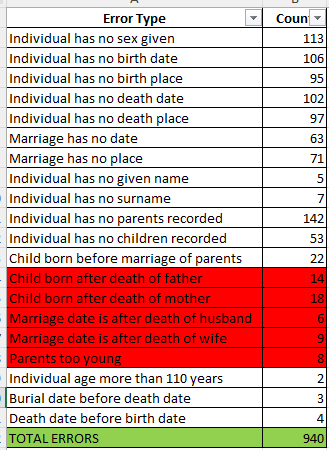
Here’s the report I got from Legacy (the error types flagged by Ancestry are in red):

Let that sink in: 940 total errors, almost all of which are legitimate and actionable. Of that, there was only 55 errors that Ancestry claimed was 301 and they didn't identify these people! I plan on cleaning up all of the errors Legacy found as having two individuals over age 110 years is a problem Ancestry should have discovered. And the individuals with no sex given? That is a continual flaw in Ancestry's system when you are adding new individuals.

Unlike Ancestry’s Tree Checker, which falsely flagged over 10,000+ records in my tree, Legacy gave me a clean, accurate list I could work with. I now have the names and the issues. I’m going through them one by one and making the corrections directly in my Ancestry tree, since that’s still my primary working tree. I’ll continue syncing it with Family Tree Maker.

And if I get another $7 Pro Tools offer in the future? Sure, I might try it again just to check whether they’ve cleaned up the bugs. But I’ll cancel it right after. Because let’s be honest:

If Ancestry really wants our trees to be accurate, they should provide these tools for free.

We are already paying for the data, the DNA, the platform and in many cases, contributing our own hard-earned research. Charging extra for a tree-checking feature (that doesn’t even work right) feels like asking users to fix the foundation of the house they already paid to build.

So, skip the upsell. Use free software. Clean your tree with confidence. And let’s keep our standards higher than their price tags.

Book Review: Echoes in the Blood

Dick Robinson’s Echoes in the Blood: How the Past Lives On in Us is an unusual combination of genealogy, family memoir, history, and recons...