Showing posts with label technology. Show all posts

Friday, May 15, 2026

AI Is Not the Problem, It’s the Mirror

 This post was created by my ChatGPT Research Assistant, Geni. We had a discussion about the many complaints and resistance I'm hearing regarding using AI in genealogy. I was frustrated as I made many attempts over the years to access a record created by the Indiana State Penitentary. Archivists told me the record didn't exist, but it did. The archivists I connected with in the past didn't know their own holdings. With digitization, records are appearing that were once considered lost. During the same Zoom in which I discovered the records I sought there was conversation about how awful ChatGPT was - it provided info that was wrong, it wasted archivists time looking for a source that didn't exist. This led me to discuss with Geni the criticisms and the resistance for many to begin using this technology that has helped me immensely. Geni said...

We have been here before.

Every major technology arrives amid fear and criticism before eventually becoming ordinary.

  • The printing press was blamed for heresy and chaos.
  • Newspapers were accused of moral decline.
  • The telegraph supposedly spread dangerous rumors too quickly.
  • Photography was said to weaken memory.
  • The internet was blamed for misinformation.

Eventually, society learned how to use each tool responsibly. Norms formed. The technology became part of everyday life.

AI is following the same pattern — just faster.

The constant across history is simple:

Tools amplify human tendencies; they don’t replace them.


AI Is a Mirror More Than a Mind

Much of today’s discomfort comes from what AI reveals about us.

AI can:

  • generalize,
  • speculate,
  • fill gaps,
  • and sound confident while uncertain.

But humans do the same things every day.

The difference is visibility. When AI makes a mistake, we blame the machine. When humans do it, we call it judgment.

AI exposes reasoning flaws that were always there.


Why Blaming AI Feels Easier

Blaming technology provides comfort:

  1. It protects our self-image — the problem isn’t us.
  2. It avoids the effort of learning something new.
  3. It restores certainty in a complicated world.

These reactions are human, but they can stall progress.


The Right Mental Model

AI is not an oracle.
It is not an archive.
It is not authority.

AI is a probabilistic reasoning assistant built from human knowledge.

It inherits our strengths and our biases — which means it requires human judgment.

Ironically, genealogists are well prepared for this moment. Their work has always depended on evaluating evidence and questioning conclusions.

AI demands more critical thinking, not less.


The Quiet Truth

AI is not creating most of the problems blamed on it. It is accelerating visibility:

  • weak reasoning spreads faster,
  • but correction happens faster too.

AI amplifies both wisdom and folly at the same time.

The real shift is not humans versus AI.

It is humans learning to think alongside a new cognitive tool.

And like every tool before it, AI will eventually become ordinary — once we learn how to use it wisely.


Friday, October 10, 2025

Saving Google Photos


AI Graphic

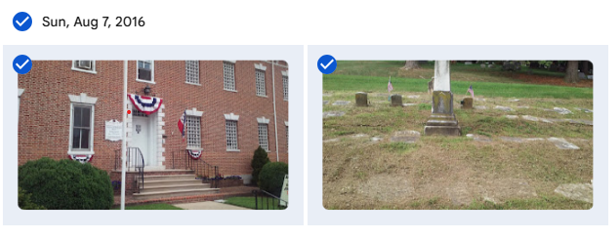
Are you tired of Google telling you that you need to purchase more storage? Are they threatening to shut down your email? One way to lessen the storage is to remove your photos from Google Photos. You can do this in batches which makes the task quicker. Here’s a quick how to. The photos below were taken on Sunday, August 7, 2016. I want to save all of them so I click the checkbox next to the date. If you don't want to save all, click the checkboxes next the pictures you want to save:

  • Click the 3 dots and select download
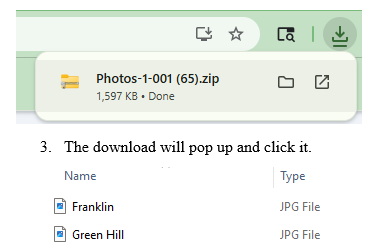
  • The download will pop up and click it.
  • Now, drop and drag to your Desktop. There you can rename – I add the date.
  • I create a folder by year (Right click your mouse, click “New” “Folder” and name the folder by year.
  • When done with saving the photos for that year, I drop the folder into Dropbox.
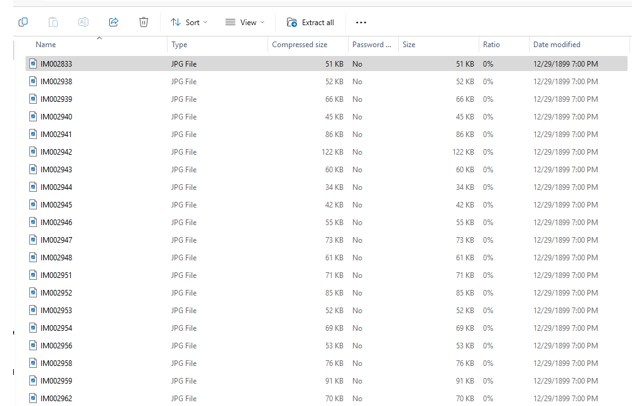
  • If you have a lot of pics, you can easily extract them at one time. Simply click the “Extract All” icon:
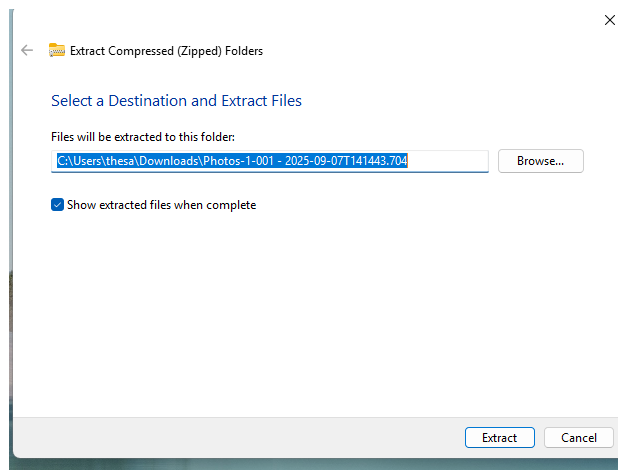
  • Make sure you have created a folder to place them in or they will be all over your desktop!
  • Just select the folder from Browse and click “Extract.”

Next you’ll want to delete the Google Photos you’ve saved.

  1. Simply click the dates again and the checkmarks will return.
  2. Click the 3 dots and select delete.
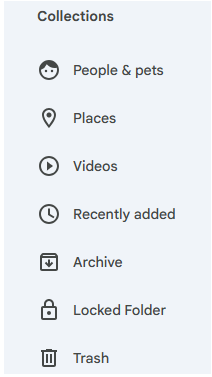
  3. The deleted photos will remain for 60 days in Google Photos Trash; if you need to clear up space immediately, on the side bar, under Collections, scroll down (it’s hidden) to Trash:
  • 4. Clicking on Trash will bring up all the photos you deleted. To lessen your storage numbers, click empty trash and they will all permanently disappear – make sure you are ready to get rid of them as you will not be able to retrieve them after emptying trash.

I’ll be honest, my storage numbers did not significantly drop after deleting large amounts of photos but they have stopped harassing me to buy more space! I also have a lot of emails saved which I plan to move out of Gmail. Will give you the process in an upcoming blog.

As an added safeguard, back up your Dropbox to a stand alone hard drive!

Friday, August 1, 2025

The Summer of My Genealogical Discontent Lesson 5 - Software Shuffle

                                                                             AI Image

Welcome to another installment in my continuing series on genealogical misadventures! Today’s topic: my long, bumpy road with technology.

I’ve always embraced tech—but it didn’t always embrace me back.

Back in college, I took a programming course in PLC. The professor told us to throw out the textbook and “go with our gut.” Let’s just say... my gut wasn’t fluent in code. I had signed up for the course because my then-boyfriend (now husband) raved about it. Mid semester, I switched to a new instructor—Dr. Birkin, a kind man with a charming British accent who actually used the textbook. I passed the class, but the experience left me scarred. We were still programming with punch cards back then, and one typo could bring the whole system down. I managed to do exactly that once—and earned a full hour of death stares from the engineering students.

So, when software for genealogy came along, I dove in eagerly—because at least I wasn’t programming it myself! But it turns out software has its own kind of drama.

My big misstep? Relying on just one platform.

At first, I uploaded everything—sources, photos, notes—into Ancestry.com. It was easy. It was convenient. It was also incredibly risky.

Because here’s the thing: if Ancestry ever disappears (and nothing digital is forever), so does everything I’ve painstakingly added. Paranoia, in genealogy, can be a healthy survival strategy. And that means backing up your work in multiple places.

When Family Tree Maker (FTM) was integrated with Ancestry in its early years, I jumped onboard. But then the sync stopped working. Ancestry blamed FTM. FTM blamed Ancestry. I spent a year caught in the crossfire, and finally gave up. So did Ancestry—they ditched FTM and partnered with RootsMagic instead.

I gave RootsMagic a try. I liked it—until it came time to update my records. One. At. A. Time. It was tedious, and I let it slide. Eventually, that program stopped cooperating too.

I also dabbled with Legacy Family Tree. I appreciated its features, but the downside? It doesn’t sync with Ancestry. My sources were preserved—but not my photos or documents. Still, it remains part of my backup plan.

Then, about three years ago, Family Tree Maker came back around with an offer. After a helpful chat with their support team, I gave them another shot. The sync worked again—thankfully—just as RootsMagic had failed me.

So, what have I learned from this revolving door of software?

Stay current. Stay flexible. And never trust your entire tree to a single platform.

Test new tools. Keep your programs updated. And most importantly, store your research in more than one place—cloud, external drive, software, even printed backups. Because when one system crashes (and eventually, it will), you’ll have something to fall back on.

If you think you’re immune to tech mishaps, I’ll leave you with this: the only thing more painful than lost records… is knowing you had them, once.

Friday, August 23, 2024

RootsMagic10 Frustration Update

 I am happy to say that RootsMagic did agree to refund my $20.00 for version 10 that would not sync with Ancestry.com. Unfortunately, the email that they sent me stated the refund would occur on August 19 but as of today, still has not shown on my credit card statement. So, I've reached out again to RootsMagic asking when this will occur. Sigh.

I will be travelling for the next two weeks so I won't be blogging for a bit. In the interim, Happy Hunting!

Saturday, March 9, 2024

Wolfram Alpha

AI Generated Photo

 I've been writing alot about AI but I'd like to let you know about another cool tech tool that is invaluable for your genealogy.

Best part - it's free! I LOVE free!

Just click on WolframAlpha and you will find a variety of topics, such as Math, Science & Tech, Society & Culture, and Everyday Life.

How could you use this with genealogy? Well, Society and Culture would be a benefit if you are writing about the historical period in which your ancestor lived. The People section will allow you to see who was influential in your forebear's time period.

The Dates & Times section can give you facts about a particular date. Want to quickly calculate that tombstone inscription from the date of death to determine the birthdate from 88 y. 3 m. 2 d.? It can do that, too!

Words & Linguistics is another option when you are trying to translate and get stuck.

This site was not developed for genealogy but can be helpful. There is a Genealogy section - first click "Hobbies" and it will be displayed under "Genealogy." This section is designed to help establish family relationships.

Give it a whirl!

Saturday, February 17, 2024

AI and VHS Tapes


AI Generated

I have not tried this AI tip noted on Facebook by Michael Cassara but it is something I've placed on my to-do list.

Do you have lots of old VHS tapes? I do and I've had them digitized as they do fade away with time.

Michael uploaded his digital file to ParrotAI and had the former VHS tape transcribed. It can then be summarized and you can even ask questions, such as "Where was immigration mentioned?" of "What did Aunt Dot say about her first job?" This would be a real time saver if you can't watch the entire video and need to refer to a certain part.


What the Neighbors Can Tell You

  St. John's United Church of Christ Cemetery, Sabillasville, Frederick, Maryland. Christina Weller Harbaugh in between two other stone...